


Digital Biz PLR
Digital Product Launch Checklist Template PLR MRR
Digital Product Launch Checklist Template PLR MRR
Couldn't load pickup availability
Share
🔑 Not sure what PLR or MRR means? [Read our full licence guide →]
Digital Product Launch Checklist - The Complete Launch Management System That Eliminates Launch Failures
Most digital product launches fail. Not because the product is bad, but because the seller didn't know what to do or in what order.
This Digital Product Launch Checklist eliminates that entirely.
From "I have a product idea" to "I just made my first $1,000" with every single step mapped out, automated, and tracked.
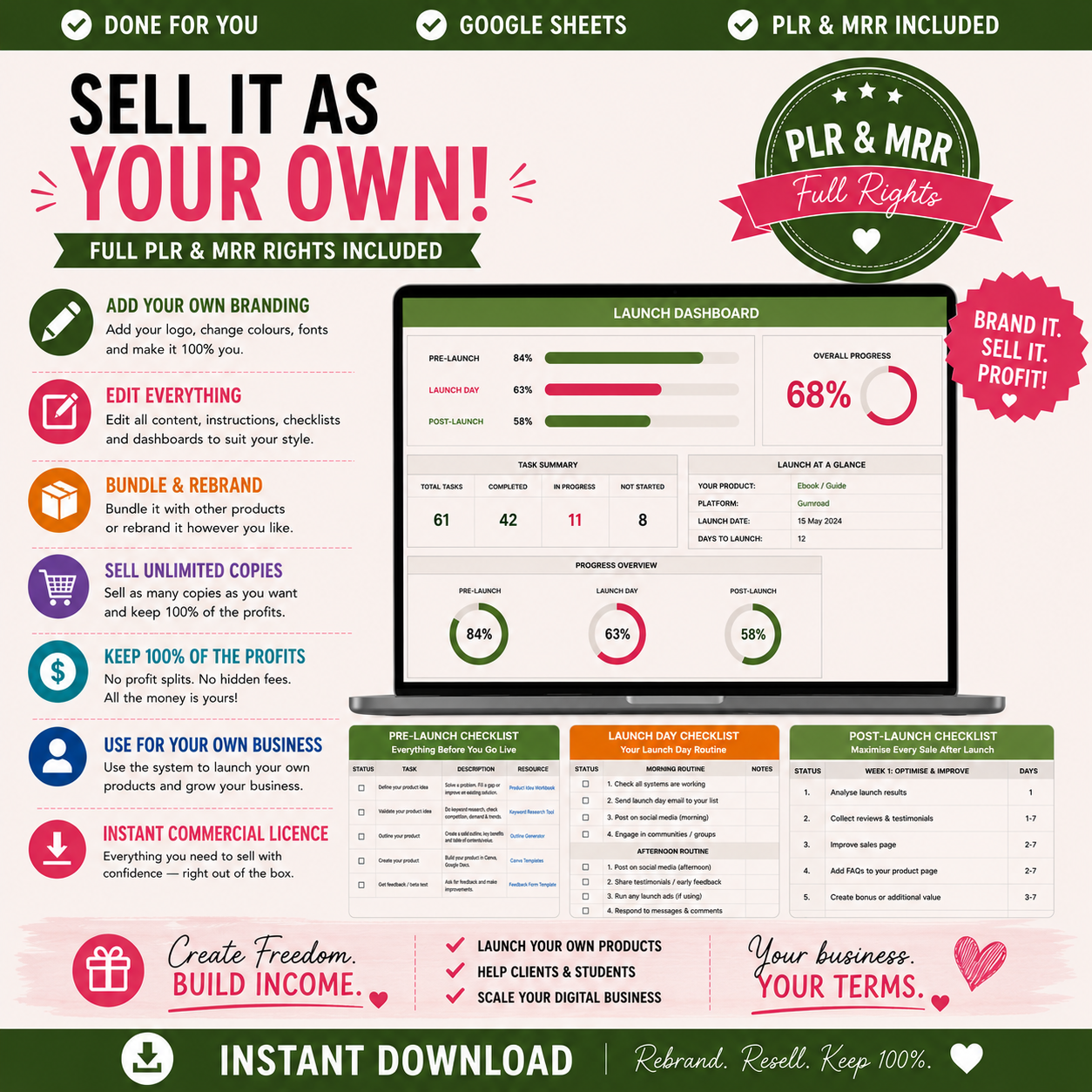
This isn't a PDF checklist you print and ignore. It's a living, automated Google Sheets system that tracks your progress in real-time and tells you exactly what to do next.
Built by Digital Biz PLR after launching hundreds of digital products. Every task has been tested. Every formula has been debugged. Every resource link points to a tool that actually works.
Six-sheet Google Sheets system. Includes: Launch Dashboard (auto-updating progress bars for all three phases, overall completion percentage), Pre-Launch Checklist (27 tasks covering product creation, platform setup, marketing prep, email sequences, social media, tech systems), Launch Day Checklist (16 tasks split into morning, afternoon, evening routines), Post-Launch Checklist (18 tasks for first 30 days covering optimization, social proof, automation, growth), Launch Performance Tracker (30-day daily tracker for revenue, orders, AOV, email CVR with auto-calculations), How To Use guide (complete instructions, 10 priority tasks for first launch, PLR/MRR rights explanation). 130+ formulas calculate automatically. Checkbox system auto-updates status. Resource column links to relevant Digital Biz PLR tools. Full PLR and MRR rights. Instant access.
✨ What's Inside The Digital Product Launch Checklist
Sheet 1: Launch Dashboard (Your Mission Control)
Fill In Your Launch Details (Yellow Cells):
- Product Name: What are you launching?
- Selling Platform: Etsy, Shopify, Gumroad, etc.
- Price Point ($): Your selling price
- Target Launch Date: When you go live
- Freebie / Lead Magnet: Your email opt-in offer
- Primary Traffic Source: Where buyers will find you
- Target Units To Sell in Week 1: Your sales goal
- Target Revenue Week 1 ($): Auto-calculates from units × price
Launch Progress Dashboard (Updates Automatically):
Pre-Launch Phase:
- Total Tasks: 27
- Completed: Updates as you check tasks off
- Remaining: Calculates automatically
- Progress %: Visual percentage with color-coded status
- Status: Not Started → In Progress → Complete
Launch Day Phase:
- Total Tasks: 16
- Same auto-tracking as Pre-Launch
- Morning, afternoon, evening task breakdown
Post-Launch Phase:
- Total Tasks: 18
- 30-day optimization and growth tasks
- Auto-tracking progress
Overall Launch Progress:
- Total Tasks: 61 (all three phases combined)
- Overall completion percentage
- Status indicator: Just Getting Started → Making Progress → Nearly There → Launch Complete
Why this matters: You always know exactly where you are in the launch process. No more "Did I forget something?" anxiety. The dashboard shows you at a glance.
Sheet 2: Before You Start (Find Your Product, Platform & Price)
STEP 1 — What Type of Product Are You Launching?
Select from dropdown (1-9):
- Printable / Planner
- Coloring Page
- POD Design
- Digital Template
- Ebook / Guide
- Mini Course
- Content Bundle
- AI Generator Tool
Personalized guidance appears automatically based on your selection:
- What it includes (worksheets, trackers, planners, journals)
- Best platform recommendation (Etsy, Gumroad, Shopify)
- Typical price range
Example: Select "Printable / Planner" → Recommends Etsy, $5-27 price range
STEP 2 — Which Platform Should I Sell On?
Two quick questions:
- Do you have an audience already? (Y/N)
- Do you want free built-in traffic? (Y/N)
Recommended platform appears instantly with reasoning:
- No audience + want traffic = Start on Etsy (built-in search traffic means buyers find you without an existing audience)
- Existing audience = Gumroad or Shopify (keep 90-100% of profit)
STEP 3 — What Price Should I Charge?
Automated pricing calculator:
- How many pages / items does your product have? (Input number)
- How many hours did it take to create? (Input number)
- What is the lowest competitor price you found ($)?
- What is the highest competitor price you found ($)?
Calculations appear automatically:
- Recommended price range: $30 to $44
- Competitor midpoint price: $22
- Pricing advice: "Good price range. Launch at the lower end of your range to get initial reviews then raise the price after 5-10 sales."
Why this sheet exists: Most people guess at pricing or undervalue their work. This calculator uses proven formulas to give you a profitable price range backed by competitor research.
Sheet 3: Pre-Launch Checklist (27 Tasks — Everything Before You Go Live)
Type ✓ in the checkbox column when complete. Status updates automatically to:
- ✓ Done
- ⚡ Skip (if you decide to skip)
- ○ To Do
Progress percentage on Dashboard updates automatically.
PRODUCT CREATION (7 Tasks)
| Task | Detail / How To | Resource / Tool |
|---|---|---|
| Define your digital product | What exactly are you selling? PDF, template, generator, bundle, ebook | Printable Generator → digitalbizplr.com |
| Validate your niche before building | Use ePank or the Niche Validator to confirm people are actively searching for your product idea | Niche Validator → digitalbizplr.com |
| Create or customize your product | Canva for templates and planners. ChatGPT for text. Lovable for AI-assisted tools | Coloring Page Generator / POD Generator → digitalbizplr.com |
| Create your product mockup images | Use Canva or Creative Fabrica mockups. Show your product at full file. Three images beats one product | Canva.com → free mockup templates |
| Write your product listing copy | Use the AI Printable Description Bundle to generate product description and 13 Etsy tags automatically | AI Printable Description Bundle → digitalbizplr.com |
| Set your price point | Research top competitors. Price at or slightly below if launching new. Price signals low quality | eRank.com for competitor pricing |
| Prepare your digital delivery file | Zip file for multi-page PDF documents. Test that your download works with Etsy | Google Drive or Shopify digital delivery |
PLATFORM SETUP (5 Tasks)
| Create your Etsy / Gumroad / Shopify listing | Upload mockup images / 10 min on Etsy / add your copy, set price, configure digital delivery | Etsy.com / Gumroad.com / Shopify.com |
| Set up instant digital delivery | Etsy does this automatically. Gumroad and Shopify need digital product apps configured | SendOwl or Shopify Digital Downloads app |
| Add your PLR / MRR licence to the listing | Include your usage terms clearly in the product description or as a separate PDF in the download | Include in your product ZIP file |
| Test the purchase and download flow | Buyer's view: Does the file download work? Pre-delete carefully | Use a different email to test |
| Set up your return / refund policy | Digital products are non-refundable. State this clearly in your listing and shop policies | Add to Etsy shop policies section |
PRE-LAUNCH MARKETING (5 Tasks)
EMAIL PREPARATION (3 Tasks)
SOCIAL MEDIA PREP (4 Tasks)
TECH AND SYSTEMS (3 Tasks)
All 27 tasks follow the same format: Task name, detailed how-to instructions, relevant resource/tool link.
Why this works: You're not guessing. Every task tells you exactly what to do, why it matters, and which tool to use. The resource column links directly to free tools or Digital Biz PLR products that make the task faster.
Sheet 4: Launch Day Checklist (16 Tasks — Your Launch Day Routine)
Split into three time blocks:
MORNING (First 2 Hours)
- Send your launch email (if pre-scheduled, verify it sent)
- Post launch announcement on Instagram and Facebook
- Share your launch in relevant Facebook groups
- Pin 3 pins to Pinterest with your product link
- Reply to any early comments or questions
AFTERNOON (Check-In)
- Check your first sales and respond to any buyer messages
- Share a "just launched" Instagram Story with swipe-up or link in bio
- Engage with 20 accounts in your niche (comment, like, share)
- Monitor your traffic source (where are buyers coming from?)
EVENING (Final Push)
- Send your last-chance email (8-10 PM performs well for urgency)
- Post evening Instagram Story: "Still available, link in bio"
- Reply to all comments and messages within 2 hours
- Set up your next day's email sequence
- Celebrate! You launched. 🎉
Status updates automatically as you check tasks off.
Why three time blocks: Launch day is intense. Breaking it into morning, afternoon, evening prevents overwhelm and ensures you don't forget critical tasks when you're riding the adrenaline high.
Sheet 5: Post-Launch Checklist (18 Tasks — Maximize Every Sale After Launch)
Split into three phases:
FIRST 24 HOURS (5 Tasks)
- Send your close / last chance email - 24 hours after launch, urgency close. Specific discount if you offered early bird pricing. Last chance builds FOMO
- Request reviews from first buyers - Message buyers personally: "I'd love to know what you think — would you leave a quick review?"
- Post your first buyer social proof - Screenshot of your first sale notification (blur buyer details). Post to Instagram and Facebook Stories
- Share behind the scenes of your launch day - What happened, what you felt, what surprised you. Humanizes your content garners trust. Post to Instagram / Facebook Stories
- Analyze your top traffic source - Where did buyers come from? Email? Instagram? Google? Double that channel this week
WEEK 1 OPTIMISATION (7 Tasks)
- Update your listing based on early data - Low click rate = change your main image. Low conversion = rewrite description. Low saves = change your title
- Add your product to relevant Pinterest boards - Pin your product to 5-10 relevant boards. Use keyword-rich descriptions for each pin
- Create a follow-up email for buyers - Email buyers 3 days after purchase. Now are they getting on? Offer help. Build relationship
- Add your product to your freebie sequence - Update your email automation to mention your new product to all new subscribers
- Set up the post-purchase upsell - Show them a complementary product immediately after checkout. One click to add — significantly boosts average order value
- Submit your listing for any relevant directories - Facebook groups or YouTube videos about "best digital products to sell in 2026"
- Create one piece of educational content about your product - Blog post, YouTube video or detailed Instagram carousel teaching something related to your product
ONGOING GROWTH (6 Tasks)
- Add more product variations - Same niche, different style or format. Buyers who love version 1 will buy version 2
- Bundle with a complementary product - Combine two products in an exclusive bundle. Higher AOV, easier upsell
- Repurpose your launch content - Turn your launch posts into Pinterest pins, email snippets, blog content. One piece of content = three platforms
- Track your 30-day performance - Revenue, orders, AOV, traffic source breakdown, email CVR. Document everything
- Plan your next product launch - What did this launch teach you? What will buyers ask for more of?
- Build your affiliate programme - Give your buyers the option to promote your product for 70% commission. Passive traffic engine
Why post-launch matters: Most sellers launch and disappear. The real money is in the 30 days AFTER launch. This checklist ensures you optimize, grow, and plan your next launch while momentum is high.
Sheet 6: Launch Performance Tracker (30-Day Daily Tracker)
LAUNCH TARGETS (Set Once at Top):
- Revenue Target Week 1 ($)
- Revenue Target Month 1 ($)
- Target Orders Week 1
- Target AOV ($)
- Target Email Open Rate (%)
- Target Email CVR (%)
DAILY LAUNCH TRACKER — 30 DAYS
Columns:
- Day: 1-30
- Date: Fill in manually or auto-populate from launch date
- Revenue ($): Daily sales revenue
- Orders: Number of orders that day
- AOV ($): Calculates automatically (Revenue ÷ Orders)
- Email CVR %: Conversion rate from email clicks to purchases
- Top Traffic Source: Where did most buyers come from today? (Email, Instagram, Pinterest, Google, TikTok, etc.)
TOTALS Row (Bottom):
- Total Revenue: Sums all 30 days automatically
- Total Orders: Sums all orders automatically
- Average AOV: Calculates automatically across 30 days
- Most Common Traffic Source: Shows which channel drove most sales
Why daily tracking matters: You can't optimize what you don't measure. This tracker shows you exactly which days performed best, which traffic sources convert, and whether you hit your targets. Use this data to plan your next launch smarter.
Sheet 7: How To Use This Checklist
Complete Instructions Including:
- What's included in this checklist - Overview of all 6 sheets
- How to use the checklists - Type ✓ when complete, type ⚡ to skip, leave blank = To Do, progress updates automatically
- The Resources column - Links to free tools or Digital Biz PLR products
- Your first launch — what to focus on - The 10 priority tasks above all others (highlighted in bold)
- PLR and MRR rights explanation - What you can and cannot do with this checklist
- Customizing and reselling - How to rebrand for your buyers
- Questions? We're here to help - Contact details
The 10 Priority Tasks for Your First Launch:
- Create or customize your product
- Write your product listing copy (use the AI Printable Description Bundle)
- Create 3 product mockup images
- Publish your listing
- Write your launch email
- Create 3 Pinterest pins
- Create 3 Instagram / Facebook posts
- Send your launch email on launch day
- Post on Instagram and Facebook
- Request a review from your first buyer
Everything else is bonus. Get these 10 right and you WILL make your first sale.
🔥 Why This Checklist vs. Launching Without One
Launching Without a System:
- ❌ Forget critical tasks (did I set up digital delivery? did I write the email?)
- ❌ No idea what to do or in what order
- ❌ Overwhelmed by 61 tasks happening simultaneously
- ❌ Launch day chaos: "What should I post? When? Where?"
- ❌ No tracking: "Did I hit my targets? Where did buyers come from?"
- ❌ Post-launch paralysis: "Now what? Do I just… wait?"
- ❌ Guessing at pricing (too low = leaving money on table, too high = no sales)
- ❌ Manual calculations for AOV, CVR, totals (time-consuming and error-prone)
With This Digital Product Launch Checklist:
- ✅ 61 tasks mapped out - Pre-Launch (27), Launch Day (16), Post-Launch (18)
- ✅ Automated progress tracking - Dashboard updates in real-time
- ✅ Every task has instructions - "Detail / How To" column explains exactly what to do
- ✅ Resource links included - Direct links to tools that make tasks faster
- ✅ Launch Day broken into time blocks - Morning, afternoon, evening routines
- ✅ 30-day performance tracker - Track revenue, orders, AOV, email CVR, traffic sources
- ✅ 130+ formulas calculate automatically - AOV, totals, progress percentages, status updates
- ✅ Pricing calculator included - Input competitor prices, get recommended range instantly
- ✅ Platform recommendations - Based on your audience size and traffic preference
- ✅ 10 priority tasks highlighted - For first-time launchers who feel overwhelmed
- ✅ Zero guesswork - Every decision is guided, every calculation is automatic
📊 Why Digital Product Launches Fail (And How This Fixes It)
The 5 Most Common Launch Failures:
1. Incomplete Product Setup
The mistake: Forget to set up digital delivery. Buyer purchases, download doesn't work, requests refund, leaves bad review.
This checklist fixes it: "Test the purchase and download flow" is Task 4 in Platform Setup. You MUST check this box before moving forward.
2. No Marketing Preparation
The mistake: Launch with no email list, no social media posts prepared, no Pinterest pins ready. Launch day arrives and you scramble to create content while trying to handle sales.
This checklist fixes it: Pre-Launch Marketing (5 tasks), Email Preparation (3 tasks), Social Media Prep (4 tasks) all completed BEFORE launch day. Launch day is execution only, not creation.
3. Wrong Pricing
The mistake: Price too low ($3 for a 30-page planner) because you're afraid no one will buy. Undervalue your work. Make $30 from 10 sales when you could have made $200.
This checklist fixes it: Built-in pricing calculator in "Before You Start" sheet. Input competitor prices, pages, hours worked. Get recommended range backed by data.
4. Launch and Disappear
The mistake: Post once on launch day. Wait. Nothing happens. Assume the product failed. Never optimize, never follow up, never track data.
This checklist fixes it: Post-Launch Checklist (18 tasks) for 30 days after launch. First 24 hours (5 tasks), Week 1 Optimisation (7 tasks), Ongoing Growth (6 tasks). The real work starts AFTER launch.
5. No Data Tracking
The mistake: Can't answer basic questions: "How much did I make in Week 1? What's my average order value? Which traffic source converts best?" Launch next product with zero insights from the first.
This checklist fixes it: 30-day Launch Performance Tracker with automatic AOV calculation, traffic source tracking, totals. Document everything. Use data for next launch.
💰 Includes Full PLR and MRR Rights
What You Can Do with PLR & MRR:
- ✅ Use for your own product launches - Personal use forever
- ✅ Rebrand with your own name and logo - Make it yours
- ✅ Customize all tasks and instructions - Add your workflow, remove what doesn't apply
- ✅ Sell as your own product - Keep 100% of profits
- ✅ Include in courses or coaching programs - Add massive value to your offers
- ✅ Bundle with other products - Increase your product line value
- ✅ Offer MRR rights to your buyers - They can resell it too (maximum value)
- ✅ Give to clients - If you're a coach or consultant
How to Customize and Resell:
- Open in Google Sheets: File → Make a copy
- Replace "Digital Biz PLR": Find and replace with your brand name
- Update resource links: Column E has links to Digital Biz PLR tools — replace with your own product links or remove entirely
- Update footer: Every sheet has "Built by Digital Biz PLR" at bottom — replace with your branding
- Share with buyers: Provide as downloadable Google Sheets file or convert to Excel
You cannot claim you personally created the original work or remove the Digital Biz PLR branding from the "How To Use" tab.
📦 What You Get Immediately
Instant Access Includes:
- ✅ Complete 6-Sheet Google Sheets System - 61 tasks, 130+ formulas
- ✅ Launch Dashboard - Auto-updating progress for all three phases
- ✅ Pre-Launch Checklist (27 Tasks) - Product creation to tech setup
- ✅ Launch Day Checklist (16 Tasks) - Morning, afternoon, evening routines
- ✅ Post-Launch Checklist (18 Tasks) - 30 days of optimization and growth
- ✅ 30-Day Performance Tracker - Revenue, orders, AOV, email CVR, traffic sources
- ✅ Pricing Calculator - Competitor-based pricing recommendations
- ✅ Platform Selector - Etsy, Gumroad, or Shopify guidance
- ✅ Product Type Recommendations - Best platforms and prices for 9 product types
- ✅ Resource Links - Direct links to free tools and Digital Biz PLR products
- ✅ Full PLR and MRR Rights - Use, rebrand, resell, pass rights to buyers
- ✅ Lifetime Access - One-time fee, use for every launch forever
❓ Frequently Asked Questions
Is this a PDF checklist?
No! This is a fully functional Google Sheets system with 130+ formulas that calculate automatically. It tracks your progress in real-time. PDFs can't do that.
Do I need to know how to use Google Sheets?
No technical skills required. Just type ✓ in checkbox cells. Everything else calculates automatically. The "How To Use" sheet has complete instructions.
Can I use this for multiple launches?
Absolutely! Make a copy for each product launch. Track every launch separately. Compare performance over time.
What if I'm launching on a platform not listed?
The checklist works for ANY platform. While it references Etsy, Shopify, and Gumroad specifically, the tasks apply universally: product creation, listing copy, marketing prep, email sequences, social media. Just adapt platform-specific tasks to your chosen platform.
Can I skip tasks?
Yes! Type ⚡ in the checkbox column to skip. Status updates to "Skip" and progress percentage adjusts accordingly. Some tasks won't apply to every launch.
What are the "Resource / Tool" links?
Column E includes direct links to free tools (Canva, eRank, Etsy, Shopify) or Digital Biz PLR products (Printable Generator, Niche Validator, Product Description Bundle) that make specific tasks faster. Use them or use your own tools—your choice.
Can I customize the tasks?
Yes! Full PLR rights mean you can edit tasks, add your own, remove what doesn't apply, update instructions to match your workflow.
How do the formulas work?
130+ formulas calculate automatically:
- Progress percentages (tasks completed ÷ total tasks × 100)
- Status updates (✓ Done, ⚡ Skip, ○ To Do based on checkbox input)
- AOV calculations (Revenue ÷ Orders)
- Totals (sums of all revenue, orders across 30 days)
- Price recommendations (based on competitor research and product complexity)
You never touch the formulas. They work in the background.
Can I sell this checklist to my coaching clients?
Yes! Full PLR and MRR rights included. Rebrand it, include it in your coaching program, sell it as a standalone product, or give it as a bonus. Keep 100% of profits.
Can my buyers also resell it?
Yes! MRR (Master Resell Rights) means your buyers can also resell the checklist. This increases the value of your offer significantly.
What if I've never launched a digital product before?
This checklist was built for you. The "How To Use" sheet highlights the 10 priority tasks for first-time launchers. Focus on those 10. Ignore the rest until you've made your first sale.
Is this a one-time fee or subscription?
One-time fee. Pay once, use forever. No monthly charges. Use for every single launch from now on.
What if I launch and nothing happens?
The Post-Launch Checklist (18 tasks) is specifically designed to turn a slow launch into a successful one. Week 1 Optimisation tasks show you exactly how to fix low traffic, low conversions, or low engagement. Track your data in the Performance Tracker to see what's working and double down on it.
🚀 Stop Failing at Launches - Follow a System That Actually Works
Digital Product Launch Checklist. Six Google Sheets. 130+ formulas. Zero guesswork. Includes: Launch Dashboard (auto-updating progress bars for Pre-Launch, Launch Day, Post-Launch phases, overall completion percentage, status indicators), Before You Start sheet (product type selector with recommendations, platform selector based on audience size, automated pricing calculator with competitor research), Pre-Launch Checklist (27 tasks covering product creation, platform setup, pre-launch marketing, email preparation, social media prep, tech systems, every task with Detail/How To column and Resource/Tool links), Launch Day Checklist (16 tasks split into morning/afternoon/evening time blocks, checkbox system auto-updates status), Post-Launch Checklist (18 tasks for 30 days after launch covering First 24 Hours, Week 1 Optimisation, Ongoing Growth, optimization and scaling strategies), Launch Performance Tracker (30-day daily tracker with columns for revenue, orders, AOV auto-calculation, email CVR, top traffic source, automatic totals), How To Use guide (complete instructions, 10 priority tasks for first launch highlighted, PLR/MRR rights explanation, customization guide). Built for Etsy, Shopify, Gumroad, any digital product platform. Works for printables, planners, coloring pages, POD designs, templates, ebooks, courses, bundles, AI tools. Full PLR and MRR Rights (use, rebrand, resell, pass rights to buyers). One-time fee. Instant access.
Perfect for: First-time digital product sellers, Etsy shop owners, Gumroad creators, Shopify store owners, course creators, coaches and consultants, PLR resellers, digital product educators, anyone launching printables/planners/templates
Launch your next digital product with confidence. Get the complete system now.
Questions? Contact us here
What You Will Receive
What You Will Receive
1 x PDF with instructions - Includes a link to your digital download.
You will receive it straight away! This is a DIGITAL PRODUCT which means no physical item will be shipped to you.
What does PLR, MRR, Commercial Output mean?
What does PLR, MRR, Commercial Output mean?
PLR (Private Label Rights) means you can edit, rebrand and resell this product as your own.
MRR (Master Resell Rights) means you can sell the product and also pass resell rights to your buyers.
Personal Use means you can use it for yourself but not resell it.
Commercial Output Rights means you can sell anything you create using this product.
Every product listing states which rights are included.
Resell Licence
Resell Licence
Each product has a resell licence attached to it. Please check the individual listing to see if they come with a Personal Use or an MRR & PLR licence. If they come with a MRR & PLR licence then you can rebrand and resell the content. If not, you cannot.
Returns Policy
Returns Policy
Due to the nature of this product being an instant download and the digital nature of this product, returns, refunds and exchanges cannot be accepted.
Make sure to read all the information and ask all of your questions before purchasing.


Did You Know Entrepreneurs Using PLR Products See 40% Higher Profit Margins
-
1. Work Smart, NOT HARD!
Our PLR products come pre-made and ready to customize, allowing you to skip the content creation process. Simply rebrand them with your colors, images etc, tweak as needed, and put them to work for your business.
-
2. If Your Marketing Costs Are High!
Our PLR products include MRR, you can resell these assets to generate additional income, covering your marketing costs and boosting profits.
-
3. Struggling to Stay Consistent?
Our PLR products are easy to use, providing you with a consistent stream of content for marketing, customer engagement, and lead nurturing, so you never run out of ideas.
Save Over 500 Hours Per Year Using Our PLR Products
Frequently Asked Questions
What is the difference between PLR & MRR products?
- Private Label Rights Products: Refers to the digital products that you can customize and sell as your own - WITHOUT the ability to pass on resell rights to your customers.
- Master Resell Rights Products: Refers to the digital products that you can customize and sell as your own - WITH the ability to pass on resell rights to your customers.
What can you do with Digital Biz PLR products?
Here are some ways you can use our digital products:
- Edit, tweak and customise in Canva, export as PDF and start selling as your own with no attribution required
- Use the product to create a new digital product, lead magnet or add to your course or membership
- Sell to your clients as a final product without having to create it from scratch
- Use for Print on Demand products such as journals, planners and ebooks
Are there any hidden or on-going fees?
No, it is just a one-time investment and you can get started!
What do PLR, MRR and Commercial Output mean?
PLR (Private Label Rights) means you can edit, rebrand and resell this product as your own.
MRR (Master Resell Rights) means you can sell the product and also pass resell rights to your buyers.
Personal Use means you can use it for yourself but not resell it.
Commercial Output Rights means you can sell anything you create using this product. Every product listing states which rights are included.
I'm ready to make money now. How do I start?
Simply Click the "Add To Cart" button on top and make your one-time purchase to get instant access to the product.